 Chris Shire
I wanted to build my little boy something to listen to audiobooks with. He already has an nfc tag reader which he uses with a square block and nfc stickers to watch tv shows on. I wanted something like a Yoto box, but without subscriptions, clouds and general proprietary bullshit.
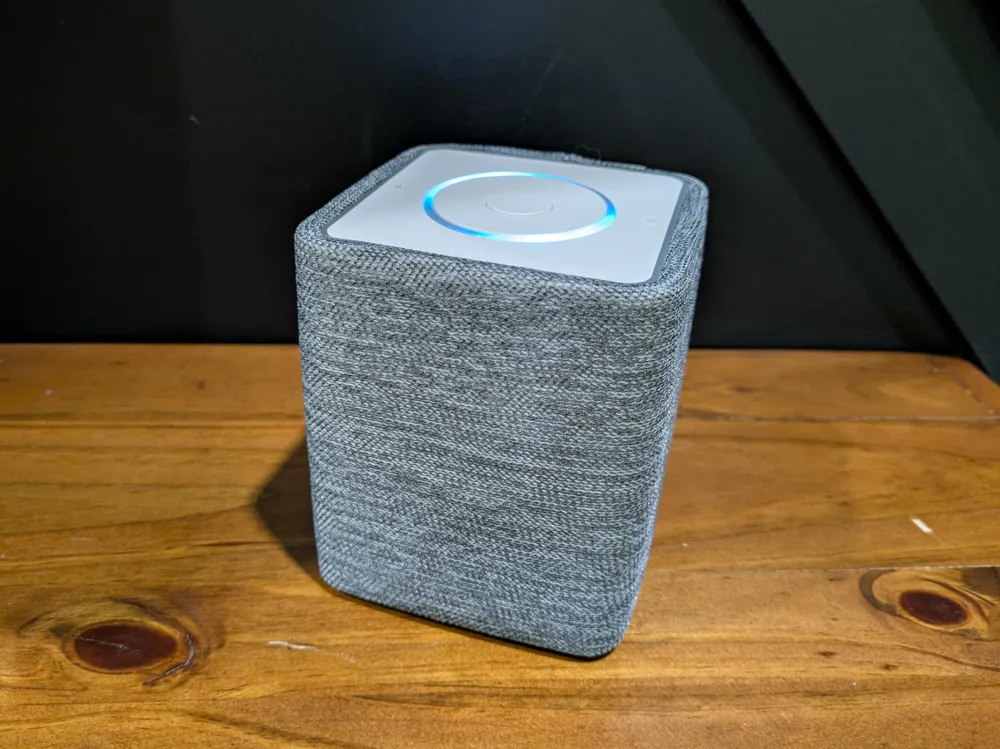
Enter…the Home Assistant Voice Preview.

I actually picked one up months ago and it has been great in the living room. I set the trigger “it’s TV time” to turn on the media pc, tv and speakers. However, it’s just an esp32 board inside…so very hackable!
ESPHome Builder
First I needed to ensure that the Voice PE was adopted by ESPHome Builder in home assistant. Previously I had been relying on the command line client, but this would make working with the Voice PE a little more challenging. The problem is that Home Assistant relies heavily on mDNS for device discovery, which I can’t get working across VLANs. The new Voice PE was going to go on the iOT VLAN, and just would not show up in discovered devices in Home Assistant.
Fortunately you can set network settings manually in yaml in ESPHome, but I still needed the device to show up so I could take control of it in ESPHome builder.
I messaged official support as well as heading to Discord and got pretty much the same advice- add it to the same VLAN as the Home Assistant install and change the network settings afterwards. That’s what I ended up doing. Pretty much immediately the Voice PE popped up in discovered devices in ESPHome builder and I could take control of it.
For posterity, here’s the yaml for the default Voice PE, along with settings for the network:
substitutions:
  name: <DEVICE NAME>
  friendly_name: <DEVICE NAME IN HASS>
packages:
  Nabu Casa.Home Assistant Voice PE: github://esphome/home-assistant-voice-pe/home-assistant-voice.yaml
esphome:
  name: ${name}
  name_add_mac_suffix: false
  friendly_name: ${friendly_name}
api:
  encryption: <Your Encryption key>

wifi:
  ssid: "<SSID>"
  password: "<PASSWORD>"
  manual_ip:
    static_ip: <Designated static IP>
    gateway: <Gateway IP>
    subnet: <X.X.X.X>
Adding the NFC Reader
Ok, issue one sorted, now to get the nfc reader working. Fortunately the Voice PE has been wired for easy expansion with its GROVE port. Now, it if I were a smarter man, I would have picked up a pn532 nfc reader with an already wired GROVE port and not needed to touch a soldering iron at all. Infact, Seeed Studio where I bought the Voice PE already sells one! That said, I need it to work in i2c mode and that board looks like it requires soldering if you need to change it from the default UART setting.
Anyway, I’m dumb and I just bought the same pn532 board I had previously used. It’s lucky that it’s wired with the same pins as a GROVE port, but it won’t have a nice neat connector- I’ll have to solder the cable on.
I added a bit of yaml to the Voice PE configuration in ESPHome Builder to make it work.
packages:
  Nabu Casa.Home Assistant Voice PE: github://esphome/home-assistant-voice-pe/home-assistant-voice.yaml
  grove-i2c: github://esphome/home-assistant-voice-pe/modules/grove-i2c.yaml

pn532_i2c:
  update_interval: 1s
  id: pn532_board
  i2c_id: grove_i2c
  on_tag:
    then:
      - light.turn_on:
          red: 0%
          green: 100%
          blue: 0%
          id: voice_assistant_leds
      - homeassistant.tag_scanned:
          tag: !lambda "return x;"
      - delay: 500ms
      - light.turn_off: voice_assistant_leds
  on_tag_removed:
    then:
      - homeassistant.event:
          event: esphome.tag_removed
This should cause the LEDs on the Voice PE to flash green when a tag was read - I wanted to have some kind of indicator.
The case
 I needed something to house all this. I found this and liked the look of it, including the additional little speaker. Home Assistant has been really clear that the onboard speaker is not designed to listen to music. That’s still basically ok for what I want, as the device is going to be used for audiobooks. I can always add an amp board at some point in the future, but the extra little speaker in this design apparently is a step up over the on board one, so I ordered one and will see how it sounds. It was super cheap on aliexpress anyway.
I absolutely suck at CAD, so I don’t think I’ll be able to add something to attach the pn532 board to. I figure it’ll be a hot glue and lolly stick type job, but it should be hidden behind the fabric. I ordered some space themed fabric (it will watch the little one’s room) and sent the design to the local 3d printing shop.
Hopefully they should come back in about a week!
Total parts list (all from Aliexpress unless noted otherwise)
1. Home Assistant Voice PE (From Seeed studio)
2. pn532 NFC reader
3. GROVE cable
4. 1.5Inch 40mm 4ohm 3Watt Speaker
5. 1.25mm two-pin micro JST connector
6. Space themed fabric
7. 3d printed parts (from local 3d printer shop)
All parts have been ordered, another post incoming once they arrive and I’ve put this bad boy together!
Useful Links for the project:
- The 3d printed case at makerworld
- Connecting a sensor to the Grove port of Home Assistant Voice Preview Edition (Nabu Casa Support)
- About the internal GPIO pins on Home Assistant Voice Preview Edition (Nabu Casa Support)
- PN532 NFC/RFID board (ESPHome)
- Grove Ecosystem Introduction (Seeed Studio Wiki)
- Home Assistant voice yaml - Useful to look up LED commands etc (Github)